> ## Documentation Index
> Fetch the complete documentation index at: https://docs.wrdnbot.xyz/llms.txt
> Use this file to discover all available pages before exploring further.
# Configuration
> How Warden's in-Discord config panel works and what each module controls.
Warden has no web dashboard. You configure everything from Discord using **`/config`** or the prefix command **`w!config`** (also **`cfg`**, **`configuration`**, **`setup`**).
Server **Administrator** permission is required to open the panel.
New here? Start with [Getting Started](/configuration/getting-started) for a full walkthrough.
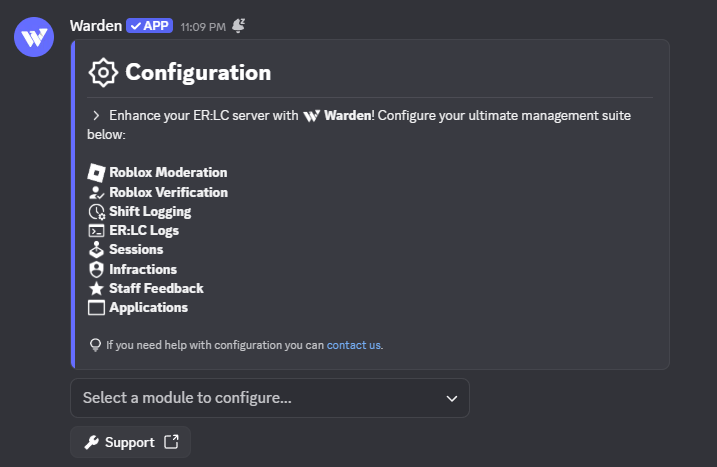
## The config panel at a glance
Run **`/config`** in a channel Warden can access.
Choose from the **Select a module to configure...** menu at the bottom of the embed.
Update toggles, channels, and roles. Click **Save** when a flow provides one.
 ## Module directory
Each row links to a dedicated page with commands, settings, and tips.
**[Permissions](/modules/permissions)** — Staff, Admin, and Management role tiers used across commands and approval flows.
**[Roblox Moderation](/modules/roblox-moderation)** — Issue in-game punishments from Discord.
**[ER:LC Server Logs](/modules/erlc-logs)** — Stream joins, leaves, kills, modcalls, and commands.
**[Sessions](/modules/sessions)** — Polls, starts, and session announcements.
All three require [ER:LC Integration](/configuration/erlc-integration).
**[Shift Logging](/modules/shift-logging)** — On-duty tracking, quotas, and leaderboards.
**[Infractions](/modules/infractions)** — Internal staff discipline with optional approval.
**[Staff Feedback](/modules/staff-feedback)** — Member-submitted ratings on staff.
**[Verification](/modules/verification)** — Roblox account linking and role gating.
**[Applications](/modules/applications)** — Custom forms with reviewer workflows.
The panel includes a **Support** button that links to the [Support Server](https://discord.gg/9mKPyknj8z) if you hit a wall during setup.
## Module directory
Each row links to a dedicated page with commands, settings, and tips.
**[Permissions](/modules/permissions)** — Staff, Admin, and Management role tiers used across commands and approval flows.
**[Roblox Moderation](/modules/roblox-moderation)** — Issue in-game punishments from Discord.
**[ER:LC Server Logs](/modules/erlc-logs)** — Stream joins, leaves, kills, modcalls, and commands.
**[Sessions](/modules/sessions)** — Polls, starts, and session announcements.
All three require [ER:LC Integration](/configuration/erlc-integration).
**[Shift Logging](/modules/shift-logging)** — On-duty tracking, quotas, and leaderboards.
**[Infractions](/modules/infractions)** — Internal staff discipline with optional approval.
**[Staff Feedback](/modules/staff-feedback)** — Member-submitted ratings on staff.
**[Verification](/modules/verification)** — Roblox account linking and role gating.
**[Applications](/modules/applications)** — Custom forms with reviewer workflows.
The panel includes a **Support** button that links to the [Support Server](https://discord.gg/9mKPyknj8z) if you hit a wall during setup.